
George Shepherd is an instructor with DevelopMentor and a Software Engineer at Rogue Wave Software. George is coauthor of MFC Internals (Addison-Wesley, 1996) and Programming Visual C++ (Microsoft Press, 1998).
|
Q I recently sat in on a COM seminar and the speaker told me that I could actually use scripting code to write my COM objects. How can this be true? Please tell me it's not. COM is for C++ junkies, and I want to keep it that way.
Steve Fitzgerald via the Internet
A Whoa there—COM is a very loving and accepting environment. And besides, some developers like to write scripting code. In certain situations scripting is a viable way to get your computing done. Although you sacrifice some programming power when using a scripting language, there are several distinct advantages. Scripting code is usually easy to write and test. In addition, scripting provides a dynamic environment that is useful for both prototyping and making changes on the fly.
Scripting was first introduced in Windows® with the early releases of Visual Basic®. Once Visual Basic became a compiled language, the main use for scripting became programming Web pages. Developers write scripts to respond to events on a Web page and on the server itself to generate the HTML that is sent to the browser client. And while it has been easy to use COM objects within your scripting code, those COM objects had to be written using a higher-level language like C++, Java, or Visual Basic. But remember that the main issues addressed by COM are software distribution and runtime integration. COM tries to be as language-agnostic as possible, and now you can employ scripting not only for using COM objects but for writing them as well. The Windows Script Components (WSC) let you package scripts for use as COM components.
The Big Picture
From a high level, WSCs are simply Extensible Markup Language (XML) files containing some scripting code that exposes a COM class. I'll show you some XML that does this in a minute. XML is a markup language very much like HTML, which allows you to apply tags to a document. However, XML is a much more flexible markup language. Whereas both XML and HTML are used to describe the formatting and display characteristics of a document, XML tags can do much more, such as describe the semantic and organizational structure of a document.
Writing a component based on scripting entails writing a bit of XML that conforms to the WSC syntax. Figure 1 shows a WSC-compliant XML file. The code in this file represents the infrastructure for a scripting component. Notice the various tag elements throughout the file.
The statement in the first line of code in Figure 1
|
tells the scripting runtime to expect an XML file that conforms closely to the XML standard. (You can relax the conformance to XML by leaving out this line.) When XML conformance is enabled, element names and attributes are case-sensitive, and attribute values must be enclosed by question marks. Also, reserved XML characters like < and > must be clearly delineated when they're used in script. For example, < may represent "less than," but in a scripting language it represents the beginning of a tag in XML. The following is a list of required tags.
- The <component> element scopes the script component. The <?component?> tag instruction tells the script component engine to display syntax and runtime error messages and to enable the script debugger.
- The <registration> element defines the registry key/value pairs necessary for the script to run as a COM object.
- The <public> tag defines where any methods, properties, or events should be declared.
- The <script> element defines where the actual script code should go. Notice the CDATA section in the <script> block. It is used to hide the script itself from the XML parser.
So that's the skeleton of an XML file containing scripting code to be run as a COM component. Now I'll actually put a component in to show you how it's done. As an example, I'll create a distance converter that converts miles to kilometers and vice versa, first written in VBScript then in JScript®.
A VBScript Component
The distance converter project will consist of two simple functions: MilesToKilometers and KilometersToMiles. The component will also have properties for holding cumulative miles and cumulative kilometers. Figure 2 shows the VBScript version of the distance converter.
In addition to the scripting infrastructure described in Figure 1, the distance converter component in Figure 2 includes <property> and <method> tags and some code inside the <component> tag. The <property> tag indicates the properties of the object that are available to clients. There are two properties: CumeMiles and CumeKilometers. These properties are both readable and writeable because the component text describes ways to retrieve and set the properties (notice the <get/> and <put/> tags). The <method> tag describes the methods available on the object as well as their parameters (via the <PARAMETER> tag). The information included in this section of the XML is purely declarative. The actual property and method definitions occur within the scripting section.
The actual script code begins with the <script> tag. Because the <script> tag indicates VBScript as the scripting language, variables and methods are defined using the VBScript dim statement. This is where the CumeMiles and CumeKilometers properties and the accessor and mutator functions are defined. The conversion methods are simple VBScript functions that convert from miles to kilometers and vice versa, and return the result to the client.
The JScript Version
The script component file in JScript differs slightly from the VBScript version. Figure 3 shows the distance converter component written in JScript. Note that the infrastructure for the JScript version of the component is the same. This version defines the CumeMiles and CumeKilometers properties with read and write access. The code in Figure 3 also has MilesToKilometers and KilometersToMiles functions.
The major differences between the VBScript and the JScript components are found within the script section of the WSC file. Note that the JScript code within the script portion of the WSC file looks much more like the Java language or C++ than VBScript. Apart from the variable declarations (which begin with a var keyword), the code uses functions, and all statements end in semicolons. The other main difference in the code is the DistanceConverterJScript constructor, which sets up the component's properties and methods.
The Runtime
Now that you have these two files with some scripting code inside them, how do they become COM objects? That question is easy to answer by looking at the registry entries for a component written in a scripting language:
|
 HKCR
    CLSID
       {F3DA80D0-9B63-11D3-8069-367A6D000000}
          InprocServer32 = c:\WinNT\System32\srcobj.dll
             ThreadingModel = "Apartment"
          ProgID = "DistanceConverterJScript.WSC.1.00"
          ScriptletURL = "file://D:DistanceConverterJScript.wsc"
|
The software responsible for turning the XML file into a COM object is a DLL named SRCOBJ.DLL. When script components are registered as COM objects, they get the same entries as any other COM object—most importantly there's an InprocServer32 entry. To get scripting to work, this entry points to SRCOBJ.DLL. In addition to the InprocServer32 key, there's also a ProgID key (for the registered name of the component) and a ScripletURL key. The ScriptletURL key holds the path to the WSC file.
To use the distance converter object, your code simply calls the normal COM activation APIs (CoCreateInstance for C++ developers, CreateObject for developers using Visual Basic and script)—the same as it would for any other COM object. The COM runtime looks up the CLSID, locates the DLL to load using the value associated with the InprocServer32 key, and loads the scripting object wrapper (SRCOBJ.DLL). Then the scripting object wrapper DLL loads the file named by the ScriptletURL key and dispatches method calls into the scripting object by implementing IDispatch on behalf of the scriptlet. SCROBJ.DLL does this by exercising the Active Scripting protocol that I looked at in my December 1999 column. That is, SCROBJ.DLL implements IActiveScriptSite and drives the selected scripting engine via the scripting engine's IActiveScript and IActiveScriptParse interfaces.
Registering the Script Object
Once you have the file for the scripting object written, you need to get that information into the registry. There are several ways to make this happen. You can use regsvr32—the handy utility for registering any COM class—or use Windows Explorer.
A new version of regsvr32 ships with the scripting components. Its command line looks like this:
|
regsvr32 file:\\d:\DistanceConverterJScript.wsc
|
|
If you are missing the new version of regsvr32.exe, you can use the legacy version to register the script component runtime DLL using the following command line:
|
regsvr32 scrobj.dll /n /i:file:\\d:\DistanceConverterJScript.wsc
|
Of course, the easiest way to register the component is to find the WSC file in Windows Explorer, right-click the script component (.wsc) file, and choose Register from the context menu.
Script Components and Type Libraries
The beautiful thing about COM is the way components are components. The client doesn't typically care what goes on behind the veil of interfaces. Script components are simply regular COM components dressed in script clothing. Naturally, if you have a component, sooner or later you'll run into a client that wants to use a type library describing your component.
As it turns out, you can create a type library for your script component using one of three methods. The first is to create the type library programmatically by using the script component's runtime type library generator. Within your scripting component, you can create the type library generator using the CreateObject API, which gets you a pointer to the type library generator. You then point the type library generator to your scripting file (the WSC file), give your type library a name, and ask the type library generator to write the type library. When you put the registration code in the <registration> portion of your WSC file, the type library will be created when you register the script component in the regular way.
The second way is to ask the WSC file to generate a type library for you by using the RUNDLL32 utility. SCROBJ.DLL has an entry point named GenerateTypeLib that will generate the type library given some command-line parameters. For example, the following command line creates a type library for a scripting component:
|
 rundll32.exe c:\winnt\system32\scrobj.dll,GenerateTypeLib
    -name:DistanceConverterJScriptTLib
    -file:d:\DistanceConverterJScript.tlb
    -doc:\"DistanceConverterJScript typelib\"
    -guid:{6576834a-a252-11d1-9fa1-00a0c90fffc0}
        -major:1  -minor:0
    -URL:d:\components\MyComponent.wsc
|
Finally, the third and simplest way is to find the scripting file in the Windows Explorer, right-click on the WSC file, and select Generate Type Library from the context menu.
The Windows Script Component Wizard
As with all things COM, writing scripting components entails gobs of boilerplate code. That's a perfect reason to use a Wizard to generate scripting components. You can get a wizard that does this directly from the Microsoft Web site at http://msdn.microsoft.com/scripting.
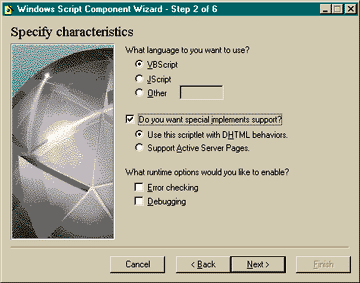
When you run the wizard, the first screen asks you to name your scripting component and point out a directory to dump the source code. The second screen lets you choose the scripting language to use (see Figure 4). You can pick VBScript, JScript, or another scripting language, provided you have the right scripting engine installed on your machine.
|
 |
|
Figure 4 Selecting the Script Language
|
You can also direct the wizard to add Dynamic HTML behaviors or the ASP handler to your object. You can also turn on error checking and debugging. Error checking causes the scripting runtime to generate runtime and syntax error messages, while the debugging option causes the script debugger to pop up when there's an error.
Finally, the Script Component Wizard displays three screens for adding properties, methods, and events to the component. The wizard then pumps out the boilerplate code, which can save lots of time when you're developing
a component.
Conclusion
COM is all about getting software to work together, even though the software is written in different languages. Why should scripting be any different? Windows Script Components technology lets you write code in script and expose the code as a COM object. All you need is a straightforward XML file with the proper tags and some scripting code to let the scripting component engine (SCROBJ.DLL) parse the file and expose the script code as an object.

|
|
Have a question about programming in Visual Basic, Visual FoxPro, Microsoft Access, Office, or stuff like that? Send your questions via email to George Shepherd at 70023.1000@compuserve.com.
|
|
|