|
It's Simple to Build PerfMon Support into Your Apps With a Little Help from COM
|
|
Ken Knudsen
|
| Debugging a problem in a self-contained executable is one thing, but when a program is made up of many different components, tracking the problem could take weeks or months. By using performance objects and their counters, you can diagnose all sorts of problems that might arise. |
|
This article assumes you're familiar with C++, COM, Windows NT |
Code for this article: COMPerf.exe (203KB)
Updated January 10, 2000
Ken Knudsen and is a senior associate at Sage Information Consultants and president of Light Wizard Gaming Productions. Sage was recently appointed to a seat on the Microsoft Certified Solution Provider Partner Advisory Council.
|
Performance monitoring, a feature of Microsoft® Windows NT®, is an extremely valuable asset for keeping an eye on the performance of your system. Unfortunately, hooking up your app to PerfMon has never been an easy task since exposing your performance data can be a bit tricky. To complicate matters, the code underlying performance monitoring is extensive, and the size of an application increases when you add PerfMon support the old-fashioned way.
However, a new day has dawned in the use of PerfMon— not only in performing the hook, but in maintaining a low memory footprint within the applications that will use PerfMon. In this article, I will show you new ways to harness the power of performance monitoring for use with your own applications.
Why Bother with PerfMon?
If PerfMon support is so resource-intensive and tough to implement, you may wonder why you should bother with it at all. In today's n-tier environment with remote and local components making up a working program, finding a particular bug or performance problem can be a nightmare. For example, COM problems commonly occur when using multiple threads. Threads sometimes go rogue and don't release resources—eating up precious CPU cycles and memory. Finding the source of this problem in a self-contained executable is one thing, but when a program is made up of many different components, tracking it down could take weeks or months. This is where custom counters come into play.
Through the use of performance objects and their counters, you can diagnose all sorts of problems that might arise. Counters can be used to track the creation and deletion of threads, as well as any resource used during the thread's lifetime. When providing performance monitoring support, the problems can be traced by viewing the information in PerfMon.
Previously, for an application to take advantage of PerfMon, you had to implement a number of data structures, which increased memory overhead. Then in the August 1998 issue of MSJ, Jeffrey Richter simplified adding counters to your application in his article, "Custom Performance Monitoring for Your Windows NT Applications."
But both Richter and Steven Pratschner (in his Microsoft Knowledge Base article, "Instrumenting Windows NT Applications with Performance Monitor") implemented the majority of the code within the client and watched their application's memory overhead increase with the insertion of classes, macro maps, and so on. Keep in mind, they made all this resource commitment for just one application. If you are doing something like monitoring the performance of a device driver, adding support this way might be appropriate. But for something as simple as debugging, there has to be an easier way. This is where COM enters the picture.
It's the Power of COM
As I mentioned, it can be complicated to hook up an application to the Windows NT PerfMon. Even with wrapper classes it can get ugly. In both Richter's and Pratschner's code, the #defines and Maps make it easier for a C++ programmer to implement, but definitely not easier for a programmer using Visual Basic® or the Java language. I'll show you how to make a common set of interfaces that an application can call to update, delete, or add new counter information to PerfMon.
The Shared Property Manager (SPM) in Microsoft Transaction Server (MTS) allows components to share a global state in a secure manner, without all of the setup hassles usually associated with such a task. With the SPM, you define a root key, also known as a property group. This root key allows for a locking mechanism to be in place when a user accesses the shared state. Once you have a property group defined, you can create any number of properties to be shared among different applications. All the new properties that are created will be accessible under the previously defined root key. In this article's code sample, for every performance object (PO) there can be any number of counter objects (CO). This analogy also holds true for the SPM. This means that through shared state and some COM magic, you can do the work in one COM server executable and one performance monitoring DLL.
PerfMon Past
 |
|
Figure 1 Typical Counters
|
Before I discuss what makes up the COM server, I'll take a look at what you used to need to get PerfMon going: a unique Win32® DLL that exposes three methods. These methods were used to gather information and were indirectly invoked via a call to RegQueryValueEx. In most situations, a unique DLL had to be present for each of your PO/CO pairs. Thus, if you had 20 applications that used performance monitoring, you often needed 20 separate DLLs to support them (see Figure 1). Remember, performance monitoring has its costs.
 |
|
Figure 2 Abstracted Counters
|
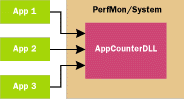
To pare things down a bit, it would be great to allow multiple POs to exist in one unique DLL and remove unnecessary overhead from your clients. Of course, this is where the COM server comes in. Using a COM server solves a lot of problems associated with previous implementations. First, your executable image will no longer need complex macros, which lead to bloated code. Second, your many unique DLLs will now become one thanks to COM (see Figure 2). Third, and most importantly, you will define a set of common interfaces that any COM-enabled environment can call, so you won't have to provide unique implementations for every application in which you want to have monitoring support.
|
 |
|
Figure 3 The PO/CO Sample App
|
The sample I provide with this article demonstrates a way to implement PerfMon support with a COM server. In the interest of space, I have left out several less significant details such as some error checking and locking mechanisms. I will, however, discuss customizing the component and the use of locking mechanisms later. To demonstrate the power of the COM server, I created a client program (see Figure 3) that demonstrates some of the methods and shows how to use the interfaces that are needed to make different POs and COs for your apps. Before moving on, I should point out that to execute my sample you will need Windows NT 4.0 Service Pack 3 or greater and any compiler that will support the COM language.
Moving to a COM Server
There are a couple of ways you can provide support for PerfMon. It is possible to use the SPM to create exactly what I'm going to do with the COM server. You can write the component using MTS, but I decided to do it with a COM server executable so that you can see how the guts work. Then you can implement one through MTS if you like.
The server sample included with this article is called PerfSrvExe. PerfSrvExe has two responsibilities: to keep track of all performance and counter object information across any number of applications and to register and unregister any new or existing PO/CO information.
There are two coclasses that you can instantiate: PerfSrvObject and RegObject. The first class contains a number of methods that are used to add and maintain PO and CO information. Within these methods (see Figure 4), PerfSrvObject uses three other interfaces, IPerfPerformanceObject, IPerfCounterObject, and the IPerfParentObject. These interfaces are key to maintaining PO and CO information. I will be looking at them in more detail shortly.
RegObject is a simple object. It currently contains two methods: Register and Unregister. Everything that happens within the Register interface concerns the setup of two files: name.h and name.ini. These files contain crucial information that a program called lodctr.exe uses to enter PO and CO information into the registry. If you want PerfMon to pick up a new PO, you need to call the Register method and pass in the PO name and the .DAT file location that contains its information. You should make sure PerfMon.exe is not running, otherwise it won't pick up the new additions until you restart it.
The PerfSrvObject Object
So now let's take a closer look at PerfSrvObject. This class contains the main interface that I will be working with, IPerfSrvObject. Among other things, this class maintains a constant list of all the POs that have been created during the server's runtime. To keep things simple, I have only included the few methods needed to get the example rolling: AddPO, GetNumPO, FindFirst, a few navigation methods, GetCurrentPO, Load, and Save.
The AddPO method is painless; it takes two parameters, the name of the PO and the help string that will be associated with the PO. GetNumPO is even easier. It just returns the number of POs that are currently active within the server. The FindFirst method takes the name of the PO as its only parameter. This method is used to quickly retrieve a given PO. The navigation methods are essential for finding and moving between different PO and CO instances contained within a list that the server holds.
It's important to note that the raw move methods (MoveFirst, MoveNext, MovePrevious, and MoveLast) shouldn't be used from other applications until a method is added that performs locking. Since there is only one instance of a list created, it is possible that one client can move the record of another client's PO interface pointer (see Figure 5). This is easily avoided by adding a generic method that takes a CO name and returns its values. In this method you would provide the proper locking mechanisms to ensure that the right data is returned.
|
 |
|
Figure 5 Needs Record Locking
|
Currently, the IPerfSrvObject and IPerfPerformanceObject interfaces each have their own copy of the same navigation methods because the former uses its navigation methods to scroll through the POs it handles and the latter scrolls through any COs it handles.
Once a PO has been found, you would use the GetCurrentPO method to retrieve the interface pointer to it. With the PO interface, you can begin creating and then cycle through any existing COs that the current PO handles.
Initially, I wasn't going to add the Save and Load methods of the COM server to my code sample. However, when I began testing, I quickly decided to include them because I found myself having to recreate the POs and COs manually every time I wanted to debug or view the information in PerfMon. As you may have guessed, the Save and Load methods allow you to keep a persistent image of your COM server on disk. The implementation of these methods is pretty basic.
The Save method takes two parameters: a path name and a file name. It cycles through all the active POs, calling the Save method on each, which in turn cycles through the contained COs, invoking their Save methods. Upon completion of the loop, you end up with an IStream pointer that holds all the information, which you then persist to disk.
The Load method works in reverse. It opens the binary file and reads the information into an IStream pointer, which in turn cycles through a loop, recreating the POs and COs, respectively. Once you become familiar with PerfSrvExe and understand the setup, you will begin to see the usefulness of the Save and Load methods. They allow you to create different sets of POs and COs that you don't necessarily want showing up in PerfMon all the time.
To recap, the IPerfSrvObject interface contains a number of methods that are used to cycle through and retrieve POs. It also allows you to save and load complete images to disk so that you don't have to manually recreate your layout each time the server is started. The GetCurrentPO method in IPerfSrvObject returns the current interface that maintains a PO's layout in memory. The interface it returns is called IPerfPerformanceObject.
The Performance Object Interface
Recall that PerfMon looks for objects in a one-to-many order. That is, it handles one performance object for many counter objects. The IPerfPerformanceObject interface handles a number of methods (see Figure 6). However, I will only be looking at two: AddCounter and GetCurrentCO.
The AddCounter method is similar in design to the AddPO method of the IPerfSrvObject interface. It takes two parameters: the CO name and the CO help string. This method is straightforward; it creates a CO interface and sets the name and help string of the object. It also performs a couple of extra tasks. First, it makes sure that the order of index values across all the COs is properly maintained under the PO. Second, after properly initializing the value of the CO to 0 and 3, it sets the data type that this counter object will be handling. My sample handles only DWORD values. You are free to experiment with other data types, but you will probably never need to move beyond a DWORD value for most of your performance and debugging needs. Once the method is finished populating the CO methods, it adds the CO instance to an internal list so that it can be retrieved later.
The m_numCounters property is the current number
of COs active within the PO. Since I'm using navigation methods to move between objects, the m_numCounters property is nice to have.
Now you've had a look at all the important methods of the IPerfPerformanceObject interface. GetCurrentCO returns the next interface defined in the PerfSrvExe server, IPerfCounterObject.
The Counter Object Interface
The IPerfCounterObject interface is essential to my setup because it holds the property data that PerfMon uses to update its viewing area. Without it, I wouldn't be able to track any counter values whatsoever. The interface is made up of just three methods, two of which are property methods.
I have already shown you one of the methods, Write, which gets passed an IStream pointer, into which the CO will write the current state of its member variables. I'll look at another of its methods later.
The two properties that this interface handles are the data type and current value members. The only data type my sample supports is a DWORD value. The second property contains both Get and Put methods for obtaining and setting the current value of the CO. The data member for holding value information is a Variant data type because PerfMon handles a variety of unique data types.
As you can see, the main purpose of the IPerfCounterObject interface is to hold information that is essential for displaying your data in PerfMon. You will notice that IPerfPerformanceObject and IPerfCounterObject have three properties in common: name, help string, and index value. My new interface, IPerfParentObject, is actually responsible for maintaining the state of these three items.
The Parent Interface
Currently, the IPerfParentObject interface holds only three properties that are common between IPerfCounterObject and IPerfPerformanceObject. The IPerfParentObject interface is actually contained within the IPerfPerformanceObject and IPerfCounterObject classes and can be obtained by calling the GetParent method. Both the PO and CO have this method, and by calling it, an interface pointer to the contained Parent class is obtained. From there you can query for the name, help string, or index value. The Explain button found on the PerfMon application displays the help text for a given object. Right now there isn't actually a method for displaying your PO's help string in PerfMon—only the CO's information can be viewed. Whatever the case, you still need to maintain a help string value for the PO in case it ever becomes exposed to PerfMon.
You have seen that the IPerfSrvObject interface serves as a main doorway into your program. It handles PO object creation, maintains a static list of all POs, and can return a PO for further interrogation. With a reference to the PO interface (IPerfPerformanceObject), you get some of the same functionality as you do with the IPerfSrvObject interface, but what sets this interface apart is its control over IPerfCounterObject. It's through this interface that you actually store and retrieve the counter data that the Windows NT Performance Monitor uses to update itself.
Now that you've seen the interfaces that make up the PerfSrvExe server, I'll move on to a more detailed explanation of how they make the clock tick.
Applying the Glue to the Interfaces
Earlier, I mentioned that you can now update a known counter from any application. How is this done? You might be thinking that the PerfSrvExe server is a singleton object, but it's not. Why? In short, you would use a singleton object because you need to maintain one occurrence of an object's state. But by developing a COM singleton, you are violating an important rule of COM: CreateInstance must return a new, uninitialized interface pointer to the requested object. So how do you stay out of COM jail? You declare a static variable in the header file. For a more in-depth overview, I suggest you download the sample code from the MSJ Web site and have a look through it on your own. In this article, I'll focus on a couple of important points about the server.
The first item is the static member variable (m_POMap), which is actually a <map> template defined to hold a BSTR and an IPerformanceObject pointer (POTYPE). By defining the variable as static, you can maintain one set of POs and COs that any application can access for updating. It would defeat the purpose of using the Performance Monitor if only one value could ever be shown on its display screen or if you had to shut down PerfMon and restart it every time you wanted to update the counter.
You will also notice another member variable defined as POTYPE: m_curPO. This member handles the current PO you are using within your object. It isn't a static member variable because it doesn't need to be. There is only one static member of this object—the m_POMap variable. By defining the current item holder as unique to each object instance, you can eliminate the need to add locking mechanisms to your IPerfSrvObject interface and concentrate on adding the locking code to the PO and CO classes. You can do this because the current item holder (which can't be used by anyone except the creator of the object) holds onto its current position within the <map> list. The only code that needs to be protected when moving between items of the <map> template are the Move methods within the PO interface, and they can easily be maintained within a critical section.
You should now have an understanding of how the PerfSrvExe component and its interfaces work, and what kind of state each maintains. The next logical step is to see the component in action in PerfWin32.dll.
From the Server to the DLL
Recall that PO/CO pairs are entered into the registry
and that, via the RegQueryValueEx call, PerfMon reads these entries to find out who's interested in performance monitoring and to get information about your components. One of the entries under the PO key is a string type called Library. The value of this key ultimately directs PerfMon to the DLL that is responsible for handling the retrieval of PO and CO information. In my example there can be only one DLL, the PerfWin32.dll.
The PerfWin32 DLL contains one class called CPerfWin32. It exposes the three functions that PerfMon requires: OpenPerfData, CollectPerfData, and ClosePerfData. I will give a more detailed explanation of the implementation of these functions later, but first I want to talk about the setup of
the PerfWin32 DLL and the variables that are declared within it.
From now on, there will be only one DLL used among all the PO and CO pairs I create with the PerfSrvExe server. Although this requires more work, the benefits are definitely worth it.
The Internal Setup of PerfWin32
The PerfWin32 DLL relies on a couple of global variables to maintain state during its lifetime. One of the variables is used to hold a reference to the PerfSrvExe server. Another is used to maintain a list of structures, and two other helper variables are used to ensure that you return the proper CO information to PerfMon. There is one other global variable of importance derived from IGlobalInterfaceTable.
After you've read the sidebar "The Lifecycle of the Performance DLL," you will know that PerfWin32 is actually handled by many different threads that are spun off from within PerfMon. However, even though indirectly PerfMon may use threads to obtain information from performance DLLs, each DLL is queried for information in a linear fashion. This means that you don't have to worry about concurrency in PerfWin32 DLL.
But the fact remains that separate threads are accessing your global reference pointer. You have to ensure that
your global variable is marshaled properly across apartments. In this case, you are going to be using the Global Interface Table (GIT), which was available as of Windows NT 4.0 SP 3.
The first global variable, g_PerfServ, is the gateway into the PerSrvExe server. This variable is used in each of the three functions and handles retrieving your PO and CO information for PerfMon. Another important member is g_pGit. It maintains a pointer to the GIT and is used to register your g_PerfServ variable so you can safely access it from any thread within the process.
Your DLL uses two global members (g_poMap and g_curPOMap) to maintain a layout of which POs and COs are using your DLL. As you can see, I'm using a <map> template again to store information. The g_poMap variable is necessary for maintaining a list of active POs that are currently using this DLL for their counter information. As I mentioned earlier, the old method of making your own PO and CO pairs meant you had to have a unique DLL for each PO. I also said that this is easier to maintain because you are guaranteed that only one PO is going to be using
it. Since this is no longer the case, you must now keep track of who is calling. The g_poMap is quite simple; it handles an index value (of type long) and a PO name (of type BSTR).
The next variable, m_curPOMap, is really just an iterator used to maintain the PO I am currently investigating. The last of the global variables, g_objectMap, is of a <map> template as well, and is used to maintain a list of data structures. The structure, PERF_DATA_STRUCT, is defined in the PerfWin32 header file.
PERF_DATA_STRUCT contains six member variables, three of which are required by PerfMon. PerfMon requires that PERF_OBJECT_TYPE, PERF_COUNTER_DEFINITION, and PERF_COUNTER_BLOCK be used to fill out your PO and CO information. (A fourth structure, PERF_
INSTANCE_DEFINITION, may be required if multiple object instances are supported.) These structures have a number of members that need to be filled in and then passed back to PerfMon for it to display your current information in its viewing area.
The next member found in PERF_DATA_STRUCT is a long data type. It is used to maintain the size of memory needed to hold all the current PO and CO information for the three PerfMon data structures I just talked about. Another important member is used to contain a reference
to an IPerfPerformanceObject interface. This member is used to maintain an instance of the PO that goes with a given PERF_DATA_STRUCT definition. The last data member of the structure is a DWORD value, which is used to hold an ID value that is returned from the GIT when the interface is registered.
The g_perfSrv variable is used to help maintain a connection to the PerfSrvExe server component, while the g_pGit member is used to help ensure that any thread can use this variable to access the COM server. The g_poMap variable is used to maintain a list of all calling POs that want to use PerfWin32 DLL. This variable also has a companion variable of the same type called g_curPOMap. It is used to maintain a current position within the g_poMap member. The global variable g_objectMap is used to maintain a
list of PERF_DATA_STRUCT structures that are used
in storing information about the active POs and COs that are using the DLL.
I will now turn your attention to the inner workings of the PerfWin32 DLL and show how the three exposed functions put your global variables to use.
PerfWin32.dll in Action
First, the DLL_PROCESS_ATTACH message comes in. Here, you initialize COM (by calling CoInitializeEx with COINIT_MULTITHREADED set) and create the connection to the PerfSrvExe server. After this call returns, PerfMon indirectly spawns separate threads for each PO entered into the registry, signaling a DLL_THREAD_ATTACH value to be sent in the DllMain function.
Next, you make a call to CoInitializeEx(0,COINIT_
MULTITHREADED) so that you can safely use your global COM instance from any thread that accesses this DLL within the PerfMon process space. Once a thread is satisfied that it likes the performance DLL, PerfMon indirectly (through ADVAPI32.dll) calls the first of its functions, OpenPerfData. Here you are given the chance to load and cycle through all of the COs you have defined in your COM server for the given PO passed in. Based on the PO name passed in, you can find its name within your COM server and set up all the structures needed to hold the CO information.
At this time, you add entries to your global variables, g_
poMap and g_objectMap. You must maintain a small list of the PO index value and its name in your g_poMap variable, while you hold the larger data structure information within your g_objectMap variable. Remember, PerfMon still knows nothing about your POs and COs—it's not until it calls the CollectPerfData function that it learns about them.
When the user invokes the Add to Chart dialog box, PerfMon ultimately calls into the collect function with the Global string value set. Here, PerfMon may again spawn threads to collect the information. (The number of threads it launches is based on the number of POs that are being handled by this performance DLL.) At this time, you cycle through your two global variables (g_poMap and g_objectMap) and pass back the information PerfMon is looking for. When you have completed your initial global cycle, the space-delimited string of all the current POs that have counter objects selected for monitoring is passed to the collect function.
The Final Take
If you're like me, you won't really get a feel for how everything flows until you actually examine the source code. I set out to design a simplified method of adding Performance Monitoring POs and COs to applications. In the sample code you can download from the MSJ Web site, I've provided two little sample programs: TestTwo and VBRegExam. TestTwo just allows you to change the value of a particular counter. First, you start up PerfMon and select some counters to watch. Then, from the TestTwo program, select those counters, change their values, and watch how PerfMon automatically picks up the changes. VBRegExam just shows how you can create a new .DAT file that holds new types of POs and COs.
By using the methods outlined in this article, you can see how any COM-enabled environment can now use the Windows NT Performance Monitor simply by calling a few generic methods. I've even shown that using a COM server is not the only option you have for hooking up to PerfMon. The SPM in MTS can also be used.
You've seen that with the force of COM, you can take C++ to the next level and provide an easy-to-use interface that all COM-enabled environments can become familiar with.

|
For related information see:
Performance Monitoring at:
http://msdn.microsoft.com/library/psdk/pdh/perfdata_0pgn.htm.
Also check http://msdn.microsoft.com for daily updates on developer programs, resources and events.
|
|
|