Whether you're looking for a tool to help you author your first weblog, a hosting service to host it, a customizable weblog framework, or desktop authoring tools, there are plenty to choose from. For reading other people's weblogs, there are a variety of RSS aggregators at your disposal.
The most popular hosted weblog services include Blog*Spot (via Blogger.com), TypePad.com, LiveJournal.com, Xanga.com, and DiaryLand.com. All of these sites make it easy to set up a new weblog in minutes, after which you can begin posting entries using a simple Web UI. All of these services offer similar features that can include automatic syndication using RSS, template customization, WYSIWYG editing, spell checking, commenting, searching, photo albums, mobile blogging, automatic surveys, and some interesting social networking features. Most offer free limited accounts as well as full-featured commercial accounts.
The point of these services is to make blogging a whole lot easier. However, if you use a service, you'll always have a limited feature set because you don't own the code. Another major drawback is that your weblog content resides on someone else's server. Although some services make it possible to export weblog content, the overall approach doesn't let you move your weblog to a new location (or into a new application) at a later time.
Blogger.com is one site that provides an alternative, allowing you to publish your weblog to another Web site of your choice (Blog*Spot being the default option). Blogger.com stores the weblog content on its server and on the target location, so you can change publication destinations whenever you want.
If you're interested in creating your own weblog hosting service, check out Userland's Manila 9.0, a commercial content management system designed around RSS, or one of the various open source weblog frameworks. You get the source code with the latter, which allows you to customize your weblog application to fit your needs, plus you can benefit from enhancements made by others. The most popular open source weblog frameworks are probably MovableType and Greymatter, both of which require Perl and CGI support on the server. The most popular among Windows-based developers are .Text and dasBlog, both of which are implemented using the Microsoft .NET Framework.
Both the .Text and dasBlog frameworks support skinning, multiple versions of RSS, the new ATOM syndication format, categories, trackbacks, referrals, SMTP notifications, and proprietary Web service APIs. The main difference between them is how they store information. dasBlog stores content in flat XML files while .Text stores content in a database (either SQL Server or MSDE). This can be attractive for users who don't have access to a database through their ISP. However, the .Text data model allows you to host multiple blogs from a single installation (see http://blogs.msdn.com for an example). dasBlog is definitely easier to install and configure but .Text has plenty of documentation and community support.
Another popular approach is to author your weblog on your desktop and then publish the HTML files to a Web site (similar to the Blogger.com approach). Radio Userland is by far the most popular tool in this camp. One of its biggest advantages is that you can blog while offline; all of your weblog content is stored on your local hard drive. You can publish your weblog to a different server whenever you see fit and if something happens to your server, you're still OK. Furthermore, since Radio Userland doubles as an RSS aggregator, you get a weblog reader that lets you post comments on your own.
There are plenty of RSS aggregators available today that make reading weblogs a lot like reading e-mail. Bloglines.com and NewsIsFree.com provide online aggregation services that aggregate your feeds into a single Web page that you can access from anywhere. Of course, you have to be online to get to it. Desktop aggregators download feeds locally for offline reading, but then you have to be on the computer where the aggregator is installed to read them. Some of the most popular no-cost desktop aggregators include SharpReader, RSS Bandit, and Syndirella, which provide similar features including multiple RSS version support, advanced search capabilities, OPML import/export, and custom groupings.
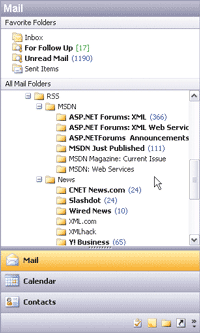
In addition to Radio Userland, one of the most popular commercial desktop aggregators is NewsGator (shown in the Figure), which plugs directly into Outlook 2000 or later. Newsgator also provides online services that synchronize with your Outlook subscriptions in order to give you the best of both worlds.
For more info on blogging technologies and standards, take a look at the XML Files in the April 2004 issue.