Q I need to create a regular expression to validate an entry in a form and make sure that a value conforms to strong password guidelines. How can I do this?
A On the whole, regular expressions are good for matching particular patterns. In contrast, a good password should be devoid of recognizable patterns.
Here is some Visual Basic® .NET code (the ideas can be easily converted to JScript®) that uses regular expressions to determine if a password contains certain characters (a through z, A through Z, 0 through 9, and so on); it then figures out if those matches mean that the password is strong (see Figure 1). The ValidatePassword function checks for strong password characteristics, such as:
- At least minLength characters in the password
- At least minNumUpper (uppercase) characters
- At least minNumLower (lowercase) characters
- At least minNumNumbers (numeric) characters
- At least minNumSpecial (non-alphanumeric) characters
- At least minNumCategories of the above five categories
A regular expression that matches the kinds of patterns you'd want would be shorter than writing a human-readable, maintainable program, but that's about all. Good password characteristics tend to cover global features of the string like how many symbols there are, which can be hard to express in a regular language.
Another measure you might consider is the amount of entropy that is in a given password. Entropy is the way unpredictability is measured. For example, if you happen to know that the first six letters of a ten-letter password are "Securi" then, though it is entirely possible that my password is "Securi^*3g", it is considerably more likely that my password really is "Security!". Those first six letters are so low-entropy that you can very easily predict the rest. If you know that the first six letters of a ten-letter password are "&5&ddV" then there is very little you can do to predict the next four, short of trying all of them. That's much higher entropy.
Anyone who is going to try and brute-force crack passwords is going to start with the small number of low-entropy passwords first (combinations of English words, for example) before trying every possible combination of letters, numbers, and symbols. By measuring the entropy of a password you can come up with some idea about how strong it is. Of course, it is important to remember that most passwords are not compromised through cracking but rather through human factors—the "Yellow Sticky Attack" or social engineering attacks, for example.
Sometimes adding even a very small amount of entropy to a password can dramatically increase its resistance to attacks. For example, which password is harder to crack, ^ft3DGpT or ^ft3DGpTABCDEFGHIJKLMNOPQRSTUVWXYZ?
The second password has barely any more entropy than the first, but by simple virtue of its length, is nearly uncrackable. This is particularly true when you consider weak authentication mechanisms—high entropy and length is best, but in a pinch lots of length plus some entropy will do.
Writing Secure Code by Michael Howard and David C. LeBlanc (Microsoft Press®, 2002) has a few guidelines on computing the equivalent bit size of a given password but does not go deep into the mathematics of computing the entropy of a password. For more, see Checklist: Create Strong Passwords.
Q I wrote a tool in Visual Basic .NET that parses an XML schema and creates documentation for it. I'm using the XMLSchema objects in the System.XMLSchema namespace.
The schema is filled with complex types that have child elements. However, there are no corresponding elements to the types; they are just included in the schema. As a result, my code isn't picking them up. How do I get to the nested child elements of a complex type that doesn't correspond to an element?
The following is an excerpt from the schema:
<xsd:complexType name="TextCell_Type" mixed="true">
    <xsd:choice minOccurs="0" maxOccurs="unbounded">
        <xsd:element name="cp" type="cp_Type" minOccurs="0"
            maxOccurs="unbounded" />
        <xsd:element name="pp" type="pp_Type" minOccurs="0"
            maxOccurs="unbounded" />
        <xsd:element name="tp" type="tp_Type" minOccurs="0"
            maxOccurs="unbounded" />
        <xsd:element name="fld" type="fld_Type" minOccurs="0"
            maxOccurs="unbounded" />
    </xsd:choice>
</xsd:complexType>
A If you iterate over the SchemaTypes collection on the XmlSchema object you will get to all global complex types including those that are not used as the type of any element. To get at the nested child elements, you need to drill down to the ContentTypeParticle property (see Figure 2). This is the post-compiled property, so make sure the schema is compiled.
Q I used the following code to query two specific pieces of information about network adapters in Windows® Management Instrumentation (WMI):
On Error Resume Next
strComputer = "."
Set objWMIService = GetObject("winmgmts:\\" & strComputer & _
    "\root\cimv2")
Set colItems = objWMIService.ExecQuery("Select * from" & _
    "Win32_NetworkAdapterConfiguration",,48)
For Each objItem in colItems
    Wscript.Echo "Description: " & objItem.Description
    Wscript.Echo "SettingID: " & objItem.SettingID
Next
How could I modify this code to query remotely? I want to query info about machine A from machine B.
A Here is a little script to get all of the network interface card (NIC) information and dump it to a servername.xml file. It takes in a list of servers from a text file.
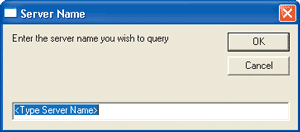
The function in Figure 3 gets the NIC details. Figure 4 shows the code in action. For the complete code, see the download at the link at the top of this article.
Q Say you have a date time string of "2003-07-02 00:06:32.700" and you know it is Greenwich Mean Time. Is there an easy way of converting this date time string to Pacific Standard Time?
A You need to convert your date into a Common Information Model (CIM) datetime format. This would then convert it into whatever time the local machine is running:
set datetime =
    CreateObject("WbemScripting.SWbemDateTime")

datetime.Value = "20030313004910.000000+000"
wscript.echo datetime.GetVarDate(false)
Q How can I get the name of the system drive using JScript?
A From Windows Script Host (WSH), you can do the following:
var shell = new ActiveXObject("WScript.Shell");
WScript.Echo("The System Drive is " +
shell.ExpandEnvironmentStrings("%SystemDrive%"));
That will work if that's the only property you want to discover about the system drive. Here's an alternate solution that solves the more general problem of querying all info about the system drive:
var SystemFolder = 1;
var FSO = new
ActiveXObject("Scripting.FileSystemObject");
var Folder = FSO.GetSpecialFolder(SystemFolder);
var drive = Folder.Drive.DriveLetter;
Now you can extract all the info you want about the drive—its name, path, date created—everything.
Got a question? Send questions and comments to webqa@microsoft.com.
Thanks to the following Microsoft developers: Rhett Attwood, Chris Beatie, Jason Cooke, Dan Grass, Rob Hawthorne, Priya Lakshminarayanan, Eric Lippert, Srikanth Mandadi, Pat Miller, Dare Obasanjo, Michael Sharps, Michael Whalen, Lisa Wollin, Mike Wyvel.