
Take for example a managed client that needs to invoke a method, Foo, that's exposed by a COM object, ACOMObject.Test. The managed client merely has to interact with the runtime-callable wrapper (RCW), which acts as the proxy for the COM object and is responsible for managing the lifetime of the COM object as well as marshaling data to and from it. This means that the code to call the COM object is no different from code that would call a managed object, as you can see in the following:
ACOMObject.Test objTest = new ACOMObject();
objTest.Foo();
Obviously this is a basic example with no data marshaling. If you want more information on data marshaling and customizing the COM wrapper classes, Don Box discusses migrating native code in his May 2001 House of COM column.
Using the wrapper classes seems simple enough, so why would you ever want to consider moving beyond RCW and write your wrapper classes by hand? Well, what if the COM object in question, ACOMObject.Test, was located on a remote machine? What would you do then?
It turns out that you can use the Activator class of the System namespace for remote access, so the previous example would look like the following:
Type type = Type.GetTypeFromProgId ("ACOMObject.Test", "MachineName");
Object objTest = Activator.CreateInstance (type);
objTest.Foo();
As you can see, DCOM is being used to communicate with the remote object. Unfortunately, this technique is somewhat self-limiting. For example, there is no way to request multiple interfaces as part of one call (and it gets expensive to make separate round-trips to instantiate interfaces). Also, you can't pass security information when instantiating the COM object. In other words, there is no way to access all the features offered by the API function CoCreateInstanceEx.
Now let's consider calling COM+ components remotely. To do so you could use a configured COM object or a ServicedComponent object. Both can leverage COM+ services by virtue of being hosted inside COM+.
To use Activator.CreateInstance to remotely instantiate COM+ components, you will need to host the client assembly inside a COM+ application. You can also remotely invoke a configured object by using the exported COM+ application proxy. Once you have the application proxy installed on the client machine, you use the embedded assembly to invoke the remote object. For the most part, this technique works well, but it has one problem associated with it—the managed client assembly is dependent on types that are not part of the public interface. This means that the CLR will attempt to load the dependent assemblies, which in turn requires them to be installed on the client machine.
For example, if you have a serviced component that relies on a data access assembly, you will need to place this assembly on all client machines. You can view the assembly's dependencies by opening up the managed client assembly using the ILDASM tool and looking for AssemblyRef tokens. AssemblyRef tokens define the external dependencies of an assembly. You can find more information on AssemblyRef tokens in the Common Language Infrastructure Specification Part II at Common Language Infrastructure (CLI).
Another option would be to use .NET Remoting instead of DCOM to call COM+ components. You can use ASP.NET to host COM+ components, which enables the managed clients to talk to ASP.NET using .NET Remoting or SOAP. If you need to pass service contexts (such as transactions) across machines, you would use the DCOM protocol.
Another difference between DCOM and .NET Remoting is that .NET Remoting requires a surrogate process (such as ASP.NET or a custom socket listener) to host a serviced component, while the DCOM protocol is natively supported. While these differences will certainly disappear over time (especially with the advent of WS-Transaction), the DCOM protocol offers the best approach available at the moment.
Another important issue is object lifetime and resource cleanup when using COM wrappers. As I stated earlier, the COM wrapper abstracts the differences between managed and unmanaged environments. This means that managed clients don't have to worry about reference counting; RCW takes care of it for them. RCWs are, in turn, garbage collected like other managed objects. This nondeterministic finalization means that the lifetime of the COM object is not directly controlled by the managed client, which can be a problem when working with resource-intensive COM objects. The way around this is to call the Marshal::ReleaseComObject method, which allows managed clients to explicitly control the lifecycle of a COM object. But this control comes at the price of additional complexity.
The runtime creates exactly one RCW for each COM object, regardless of how many instances of the COM objects exist. As a result, the reference count of the underlying COM object is always one, even if more than one managed client is connected to it. The managed clients need to be aware of this and make sure that they do not leave dangling instances of RCWs on the heap. The order in which the COM objects are released is also very important.
There is another approach besides the one I just described to force the release of the underlying COM object: explicitly invoking the garbage collector using System.GC.Collect will do the trick, but this is a rather extreme step and should be used with caution. Forcing garbage collection can be expensive because it affects all the application domains of a process.
Managed C++ is an extension of the C++ language that allows developers to take advantage of various features of the .NET Framework when using Visual C++®. The most powerful aspect of managed C++ is that it enables managed and unmanaged code to be intermixed. The Visual C++ compiler facilitates this by automatically generating the code needed to flow seamlessly between the managed and unmanaged context.
Since managed and unmanaged code can coexist, you can simply wrap an unmanaged class with a managed wrapper. The unmanaged class has complete access to the Platform SDK API functions such as CoCreateInstanceEx, which can be used to instantiate a COM object. The managed wrapper makes this functionality available to any .NET Framework-compliant language. Figure 1 illustrates this concept. The unmanaged C++ class uses the COM API functions to instantiate a COM component and the managed C++ class wraps the unmanaged C++ class, making the COM object available to the managed client.

There are several advantages to this approach. First of all, you have finer control over how the COM object is instantiated and released and when needed, CoCreateInstanceEx can be called from the unmanaged class. This enables you to obtain multiple interfaces in one call and supply appropriate security information. You can also explicitly control the lifetime of the COM object by calling the Release method. And in certain cases you'll even get better marshaling performance. For example, a marshaled data structure can be cached and used to invoke multiple managed calls. Yet another advantage is that unlike exported managed client assemblies, you control the external dependencies of the managed wrapper assembly. Finally, you can even handle COM objects that do not always play by the rules of COM and are not handled well by default COM wrappers. As you can see, managed wrappers help alleviate some of the problems that I've discussed in the earlier sections of this article.
Before you run out to build a managed wrapper class, you should know that creating it is not without its share of challenges. First, you will need to use the #import directive to incorporate information from a type library. The contents of the type library are automatically converted into C++ classes. Next, you will need to code the managed wrapper class with proxy methods that mirror the underlying COM object methods. The proxy methods simply forward the incoming request from a managed client to the underlying COM object. Finally, you will need to handle conversions between managed and unmanaged datatypes. As you can see, these are repetitive steps that can be automated.
The tool I'm about to create, which I'll call DCOMSuds, automates the generation of managed wrappers. It's not intended to be a commercial-quality tool that takes into account all the COM idioms such as connection points, events, and custom marshalers. The current version of the tool only looks for dual COM interfaces, and the data marshaling support is limited to primitive types and strings. Once you understand the process of creating managed wrappers, you will be able to add other datatypes by making changes to the files that are generated.
As the name suggests, this tool was inspired by the Soapsuds tool, which creates runtime assemblies that communicate with XML-based Web Services. DCOMSuds is similar in function except that it creates managed assemblies that communicate with DCOM-based servers. The other difference is that while the Soapsuds tool reads the metadata from an XML Schema, DCOMSuds reads the metadata from a type library. COM server descriptions can be read in from either a type library file or an assembly file that houses a serviced component, as shown in Figure 2.
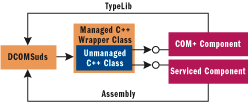
While the DCOMSuds tool can be used for both local and remote interoperations with a COM object, it is particularly well-suited for managed clients remotely calling an existing configured or nonconfigured COM server, or for remotely calling serviced components through the DCOM protocol.
Figure 3 provides the syntax for invoking the tool. As stated earlier, it can take a type library or an assembly as an input. The interface name of the COM object for which the managed wrapper assembly is to be generated also needs to be supplied. By default, an assembly is generated. The option -gc can be used to generate the managed C++ files. For additional details, see the ReadMe.txt file in the download. Once you have the generated managed wrapper assembly, invoke the DCOM-based servers from a remote machine. To do this, copy the generated assembly to the client machine, then add it as a reference to the managed client application. Add the following entry to the application configuration file to pass the location of the server:
<configuration>
    <appSettings>
        <add key="ServerName" value="machineName" />
    </appSettings>
</configuration>
You will see later how the unmanaged C++ class relies on the application configuration file for reading information such as the server location at run time. This is more XCOPY-friendly than an exported .msi file that ties the server location to the machine where the application proxy was generated. Finally, make sure that the COM object or the serviced component being invoked is registered locally using regsvr32 or regasm.
Now I'd like to explore the DCOMSuds tool. This tool was developed in C# and consists of four primary classes: Controller, TypeLibReader, CodeGenerator, and AssemblyGenerator. Each of these classes is available in the eponymous .cs file in the code download. Figure 4 lists their method and properties. Let's take a look at each individually.
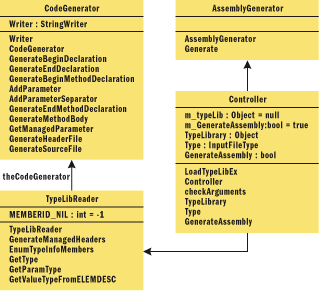
Controller This class is responsible for validating the input arguments and loading the input type library. When an assembly is supplied as an input, the controller class uses the ConvertAssemblyToTypeLib function to convert an assembly into a type library. DCOMSuds places one restriction on serviced component assemblies—it requires the use of interfaces to implement the ServicedComponent classes. It does this because the TypeLibReader class does not support class interfaces. A class interface is a COM-accessible interface automatically generated by the CLR as a result of decorating .NET classes with the ClassInterfaceAttribute. The current version of TypeLibReader requires that interfaces be explicitly defined.
TypeLibReader This class does the heavy lifting in this application. It is responsible for traversing through the type library using the UCOMITypeInfo interface of the System.Runtime.InteropServices namespace. UCOMITypeInfo is the managed definition of ITypeInfo interface. Because I wanted to develop this tool in C# (rather than C++), I started looking at UCOMITypeInfo. The article "Improve Your Debugging by Generating Symbols from COM Type Libraries" by Matt Pietrek (MSJ, March 1999) provides a good description of the ITypeInfo interface and the steps involved in traversing a type library. Therefore, I'll skip a similar discussion on UCOMITypeInfo since the two are very similar. However, I would like to point out a couple of challenges you'll encounter in using the UCOMITypeInfo interface.
Consider the following code snippet taken from file TypeLibReader.cs (I've edited the code for clarity):
IntPtr pElemDesc = FuncDesc.lprgelemdescParam;

for ( int cParams = 0; cParams < FuncDesc.cParams; cParams++ )
{
    ElemDesc = (ELEMDESC) Marshal.PtrToStructure  (pElemDesc,
               typeof(ELEMDESC));
    vt = GetValueTypeFromELEMDESC (ElemDesc);
    m_COMInterfaceDeclaration.AddParameter (vt, GetParamType (vt));

    if (cParams != FuncDesc.cParams-1)
    {
        m_COMInterfaceDeclaration.AddParameterSeperator();
    }

    pElemDesc =  new IntPtr(pElemDesc.ToInt64()
                            +Marshal.SizeOf(ElemDesc));
}
The first thing to note in this code is the use of the IntPtr structure. As there are no pointers in C# safe mode, I use the IntPtr structure, which is designed to hold a platform-specific pointer. The variable pElemDesc in the code is of the IntPtr type, which points to an unmanaged array of buffers of the ELEMDESC. To copy a single element of this array to a managed object, I use the Marshal.PtrToStructure method. The other interesting thing about this code relates to incrementing the IntPtr variable. This is accomplished by constructing a new instance of IntPtr by passing a 64-bit signed representation of pElemDesc, summed with the size of the ELEMDESC. Note that using the 64-bit representation is beneficial since it will work on 64-bit versions of Windows® as well.
CodeGenerator This class is responsible for generating various elements of managed C++ wrapper code. You might be familiar with the ICodeGenerator interface, which provides a way to generate code based on the code Document Object Model (CodeDOM) graph. The idea is that an instance of a CodeDOM graph can be converted into source code in any .NET-compliant programming language as long as the language implements the ICodeGenerator interface. Since the code being generated by DCOMSuds is C++ (and mixed mode at that), you cannot utilize the CodeDOM. Note, however, that in Visual Studio .NET 2003 it is possible to use the CodeDOM in this regard. I have attempted to model the CodeGenerator class based on this interface.
Also worth mentioning is the use of the IndentedTextWriter class for writing out C++ code. This class is particularly useful for code generation as it provides methods to control the indentation level of the output.
AssemblyGenerator This class is responsible for generating an assembly from the generated header (.h) and source (.cpp) files. Also part of the CodeDOM feature is the CodeCompiler class that allows for creation of assemblies from CodeDOM graphs and source files. Unfortunately, like code generation functionality, code compilation is not available for compiling C++ source files. As a result, I had to invoke a batch compile as shown here:
//Declare and instantiate a new process component.
ProcessStartInfo pStartInfo = new ProcessStartInfo();
pStartInfo.FileName =  @"C:\Program Files\Microsoft Visual Studio
.NET\Common7\IDE\devenv.exe";
pStartInfo.Arguments = @"/rebuild release .\gen\ManagedWrapper.sln";
pStartInfo.CreateNoWindow = true;
pStartInfo.WorkingDirectory = Thread.GetDomain().BaseDirectory;
pStartInfo.RedirectStandardOutput = true;
pStartInfo.RedirectStandardError = true;
pStartInfo.UseShellExecute = false;
(Process.Start (pStartInfo)).WaitForExit();
Now let's look at the generated managed and unmanaged C++ code. I will start with a COM object defined by the Interface Definition Language (IDL) file shown in Figure 5. Here I am defining a COM object with a component class called CTest and IDispatch interface ITest. ITest defines five methods (f1 through f5) each with a different data marshaling requirement. Study the IDL attributes associated with each parameter for a moment. These attributes will determine the signature of the managed wrapper class methods.
Figure 6 shows the code from an auto-generated header file. The code defines a managed wrapper class called ManagedCTest that wraps the CTest component class that you saw earlier. This class is part of the MSDNMagNS namespace. The ManagedCTest class also defines a private member, m_pUnMngdObject0, that points to a template class called UnManagedObject that takes two parameters. (You will see the implementation of the template class a little later.) Also make note of the CTest and ITest structs that mirror the IDL definitions of the component class (coclass) and interface. CTest and ITest are passed as parameters to the template class. The ManagedCTest class also defines equivalent wrapper methods for each method defined by the ITest interface. The key difference is that wrapper methods are defined using the Common Type System (CTS) types. The BSTR datatype is represented as String* and the BSTR* datatype is reflected as StringBuilder* in the wrapper methods.
One last thing to note in this code is that the ManagedCTest class implements the IDisposable interface. IDisposable defines a method, Dispose, that can be used to release allocated resources. The implementation simply calls the Release method on m_pUnMngdObject0. Shortly you'll see how the Dispose method allows a managed client to control the life of the COM object.
Figure 7 shows the auto-generated source file. It provides the definition for the CManagedTest wrapper methods that were in the header file. The thing to note is the data marshaling that takes place when going between an unmanaged and a managed data type. The Marshal class provides a number of useful functions that can help in this transition. The method ManagedCTest::f1 uses Marshal::StringToBSTR to allocate a BSTR and copy the contents of the String to it. This BSTR instance is passed to the COM object. The previously allocated buffer needs to be freed using Marshal::FreeBSTR after the control is returned from the COM method invocation. The method f2 has a different marshaling requirement. As shown in Figure 5, the parameter for method f2 has an [in, out] attribute. This means the COM object can change the content of the BSTR. Since the String class is immutable, I cannot use it here. Instead, I use the StringBuilder class, which represents a mutable string of characters.
You can tweak these files to make data marshaling more efficient or supply additional data conversion routines. For example, a marshaled instance of a structure can be cached and reused across multiple invocations. Again, the key to any conversion between managed and unmanaged data types is the Marshal class. It provides a collection of methods for doing the actual conversion.
Figure 8 shows the implementation of the UnManagedObject template class. One very powerful aspect of managed C++ is that it allows generic types to be mixed with managed types, despite the fact that parametric polymorphism is not currently supported by the .NET Framework. It would have been difficult to implement the UnManagedObject class without support for templates. Note how the template parameters of the UnManagedObject class correspond to the CLSID and IID of the underlying COM object. The location of the underlying COM object is read from the configuration file using the AppSettings property of the ConfigurationSettings class. The rest of the code is there simply to use the CoCreateInstanceEx/CoCreateInstance API functions to instantiate the COM object. The Release method calls Release on the underlying COM object. Finally, I need to hide the copy constructor and assignment operator.
Figure 9 shows a C# client that leverages the managed wrapper assembly generated by the DCOMSuds tool. Creating the managed wrapper class is simply a matter of instantiating the ManagedCTest object, which in turn causes the underlying COM object to be instantiated. The underlying COM object remains alive until the program exits the scope of the using statement. At that point, the Dispose method is automatically called. The using statement defines a scope at the end of which the object will be disposed. You can utilize the using statement because the ManagedCTest class implements the IDisposable interface. The Dispose method results in the release of the underlying COM object. This is in contrast to COM wrappers where the equivalent code would have simply marked an object for deletion.
When RCW and COM-callable wrapper (CCW) classes are not enough, managed C++ provides a powerful option for interoperating with COM objects. The DCOMSuds tool that I've described in the article helps automate the generation of managed C++ wrapper classes. As you saw, these custom classes give you more control and flexibility and let you deal with circumstances, including remote invocation, that require some special treatment.