Q I encountered a problem using your suggested approach to find the Internet Explorer_Server window as described in your September 2001 column. When using GetLastChild with an HTML page containing comboboxes, sometimes it returns the combobox instead of the Microsoft® Internet Explorer window. You can see in Spy++ that comboboxes are child windows of the Internet Explorer window, but sometimes OnNavigateComplete2 was called before these windows were created, which my program didn't account for. I changed the GetLastChild function to check the class name of the child window. If an Internet Explorer_Server window is found, it returns it. Do you know a better solution?
A Indeed I do, but first let me briefly remind everyone what we're talking about. In the January 2000 issue of Microsoft Systems Journal I showed how to modify the MFC CHtmlView class, which can only live inside a CFrameWnd, to remove the frame dependencies and create a new class called CHtmlCtrl that works in a dialog or any other kind of window.
Then in my September 2001 column, I showed how to disable the (browser) context menu for CHtmlCtrl by subclassing the Internet Explorer_Server window. The window that actually displays the HTML is not the browser (CHtmlView/CHtmlCtrl) window, but a great-grandchild with the class name "Internet Explorer_Server". I presented the function GetLastChild that returns the "last child" of a window. That is, GetLastChild returns the child of the child of the child... until there are no more children. This assumes a window hierarchy where each window has only one child, and the last descendant is the Internet Explorer window. Usually this is correct, but (as Michael found out the hard way) not if the document has children like comboboxes. Oops. I should've tested my code against some more complex HTML, but all I was trying to do was implement a simple About dialog. (Note that in Internet Explorer, edit controls and buttons are not child windows as you might expect.)
Figure 1 shows a class that implements a better way to obtain the Internet Explorer window. CFindWnd finds the first child window of any window with a given class name. In order to use it, all you have to do is write:
CFindWnd ies(m_hWnd, "Internet Explorer_Server");
myHwndIE = ies.m_hWnd;
The constructor calls a function that uses EnumChildWindows and FindWindowEx to search all descendant windows until it exhausts them or finds one whose class name matches the one requested. You can use FindWindow to find top-level windows, but if you want to search children, you need FindWindowEx, which was first introduced in Win32®. CFindWnd returns the first window that matches, so it's only useful for finding windows that you expect to have only one instance of. In general, when searching for special windows, it's always safest to check the class name.
But—as another reader, Domenico Belgiorno pointed out—you don't even need to subclass the Internet Explorer window to disable the context menu. You can do it completely from within CHtmlCtrl, like so:
BOOL CHtmlCtrl::PreTranslateMessage(MSG* pMsg)
{
  if (pMsg->message == WM_CONTEXTMENU)
    return TRUE; // eat it
  return CHtmlView::PreTranslateMessage(pMsg);
}
This works because MFC implements a very ingenious and powerful feature. In the main message pump inside CWinThread, MFC calls a function CWnd::WalkPreTranslateTree. This function loops through all the parent windows of the window for which the message is destined, calling PreTranslateMessage for each one and stopping if any parent window's PreTranslateMessage returns TRUE. The upshot is that you can override PreTranslateMessage to intercept messages sent to your window's descendants. Very clever!
Experience reveals that to make the previous code snippet work as desired, you must also trap WM_RBUTTONDOWN and WM_RBUTTONDBLCLK, and you should also check to make sure the target window's class name is in fact Internet Explorer_Server so you don't accidentally trap some other child window's context menu (unless that's what you want). Figure 2 shows the final code for CHtmlCtrl::PreTranslateMessage. I enhanced it so it can be configured through a property Get/SetHideContextMenu, and to send a WM_CONTEXTMENU message to the parent window instead of eating it. This lets you implement your own context menu if you like. Note that CHtmlCtrl sends WM_CONTEXTMENU when the right mouse button goes up, not down.
Q I'm using your CHtmlCtrl in my dialog-based app. Since I use it to show HTML pages that I create at run time, I would like to know if there's any way to show HTML content without first storing it in a file. Formatting an HTML string and storing it in a file simply for displaying it in the CHtmlCtrl seems tedious.
A Setting the HTML from a text string is fairly straightforward, even if the mechanics are a bit tedious in C++. If you've ever written any JavaScript, you know you can call document.write any time to write HTML directly into the document as your page is loading. The same is true in C++, but the coding is messy because you have to deal with COM and IHTMLDocument2, BSTRs, and SAFEARRAYs. Fortunately, the ActiveX® Template Library (ATL) has a number of classes that make it a breeze.
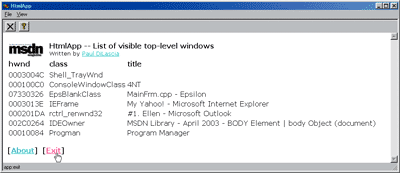
Figure 3 shows a new program, HtmlApp, modified from the AboutHtml programs in my January 2000 and September 2001 columns (see previous question) to display an HTML list of top-level windows in its main view. The original AboutHtml program showed how to implement an "about" dialog in HTML, and loaded it from a resource by calling:
m_page.LoadFromResource(_T("about.htm"));
CHtmlView::LoadFromResource opens the URL res://program.exe/about.htm, where program.exe is the actual name of your program. The res: protocol lets you open any HTML file stored as a resource. But what if, instead of loading a resource, you want to generate HTML on the fly—as HtmlApp does when displaying its list of top-level windows? As Joan points out, it's silly to save your HTML to disk, only to immediately read it back. To set the document contents directly, I added a new function, CHtmlCtrl::SetHTML (see Figure 2).
Let me take you through it step by step. First, you have to get the IHTMLDocument2 interface:
SPIHTMLDocument2 doc = GetHtmlDocument();SPIHTMLDocument2 is equivalent to CComQIPtr<IHTMLDocument2>, an ATL smart pointer to an IHTMLDocument2 interface. (For those few programmers still using COM, if you're not using ATL smart pointers, get with the program!) Next, you have to create a SAFEARRAY that holds your HTML string as a one-element BSTR array. SAFEARRAY is a COM structure for passing arrays safely between platforms. ATL provides CComBSTR and CComSafeArray classes to take the ouch! out of working with BSTRs and safe arrays:
// strHTML is LPCTSTR
CComSafeArray<VARIANT> sar;
sar.Create(1,0);
sar[0] = CComBSTR(strHTML);
Without CComSafeArray and CComBSTR, this would be 10 to 20 lines of grody code with calls to API functions like SafeArrayCreateVector, SafeArrayAccessData, and SafeArrayUnaccessData. You should feel thankful to the ATL folks that you don't have to write that stuff.
Once you have your doc object and contents in a safe array, you're ready to open the doc, write to it, and close it. IHTMLDocument2::write requires VARIANTS and BSTRs, but once again ATL comes to the rescue:
LPDISPATCH lpdRet;
doc->open(CComBSTR("text/html"),  // MIME type
  CComVariant(CComBSTR("_self")), // open in same window
  CComVariant(CComBSTR("")),      // no features
  CComVariant((bool)1),           // replace history entry
  &lpdRet));                      // IDispatch returned
doc->write(sar); // write it
doc->close();    // close
lpdRet->Release();
CHtmlCtrl::SetHTML is pretty handy. There's just one trick to using it: when you first create your CHtmlCtrl, it has no document (GetHtmlDocument returns NULL). So before you call SetHTML, you need to create one. The simplest way is to open a blank document, as shown in the following line of code:
m_wndView.Navigate(_T("about:blank"));
And by the way, if your HTML is simple enough, you can use about: instead of CHtmlCtrl::SetHTML to get your HTML, as shown in the following code snippet:
m_wndView.Navigate(_T
("about:<HTML><B>hello, world</B>
</HTML>"));
This works for simple HTML, but for more complex documents you need SetHTML. HtmlApp builds some HTML on the fly with an IMG, TABLE, and links, to list the visible top-level windows, then calls SetHTML to display it. Figure 3 shows HtmlApp running; Figure 4 shows the code.
Finally, let me point out a totally unrelated but really neat new feature I added for HtmlApp to make CHtmlCtrl even more useful. Back in the January 2000 issue, I showed you how to implement an "app:" pseudo-protocol that lets you create HTML links (anchor elements) that communicate with your program. For example, if you add a link
<A HREF="app:about">About</A>then CHtmlCtrl::OnBeforeNavigate2 will recognize "app:" and call the special virtual function CHtmlCtrl::OnAppCmd with "about" as parameter. You can make up your own commands and override OnAppCmd in a derived class to process them. After using CHtmlCtrl for a while, I soon found myself frequently deriving from CHtmlCtrl just to override this one function. What a waste of typing! To spare my fingers, I invented a simple notion of command maps that let you convert "app:command" to a normal Windows® WM_COMMAND ID:
HTMLCMDMAP MyHtmlCmds[] = {
  { _T("about"), ID_APP_ABOUT },
  { _T("exit"),  ID_APP_EXIT  },
  { NULL, 0  },
};
To use this map, call CHtmlCtrl::SetCmdMap:
m_wndHtmlCtrl.SetCmdMap(MyHtmlCmds);
Now when the user clicks the link to "app:about", CHtmlCtrl::OnAppCmd searches your command map, finds the "about" entry, and sends its parent window a WM_COMMAND message with ID_APP_ABOUT as the ID—whereupon the command enters the magic MFC command-routing superhighway, where any window along the road can handle the command. Pretty sweet! HtmlApp uses this feature to add About and Exit commands directly to the main window as HTML links (see Figure 3). Figure 2 shows the details. The only trick is that CHtmlCtrl::OnAppCmd sends the command via PostMessage instead of SendMessage because of the fact that you'll find yourself in trouble if you try to close the application from the midst of OnBeforeNavigate2. (I found out the hard way.)
Happy programming!
Send your questions and comments for Paul to cppqa@microsoft.com.